
A little less than I year ago I was forced to move to shared web hosting after running my own dedicated web & email servers for years. The reason for the move was purely financial — hardware and internet connection costs simply pushed the luxury of dedicated hosting out of reach. When searching for a web hosting service the usual suspects kept surfacing; Bluehost, Dreamhost, FatCow, HostGator, and HostMonster (powered by Bluehost). I decided to go with HostMonster based on their being one of the oldest and largest hosting companies. HostMonster also offered SSH access. Something not many hosts offer but I desired as I preferred coding in terminal. Yea, I’m that hardcore ;-). In any event I thought I was making the right decision. Boy was I wrong.
Shortly after moving my websites & email to HostMonster I encountered atrociously slow load times and a general lack of responsiveness across all of my websites. Load times of 30 seconds were not uncommon. Worse yet, DNS performance was just as slow. Queries to any of my domains were taking several seconds just to resolve domain names to their associated ip. I contacted HostMonster technical support and their staff was very quick to say my websites were not efficient and I had to optimize them in order to gain the performance I desired. In short they recommended cleaning stale records from the MySQL databases and employing widespread caching on my websites. I would later learn, after researching the issue deeper, that this is a canned response given to any user reporting slow performance, but I happily took their advice, performed the recommended database maintenance and implemented caching. Much to my dismay the impact on site performance was minimal.
As time went on performance for my websites became worse and worse. It turns out the *actual* culprit of all this was drastically oversold (overloaded) servers. When combined with an interesting technology developed by the founder of Bluehost known as cpu throttling, website performance is terribly slow. The idea behind cpu throttling is that a servers heaviest users are prevented from adversely affecting performance for other users by limiting the amount of cpu time they have access to. The proverbial slice of the pie, so to speak, is a percentage of available server resources. Great in theory. Perhaps even in practice when applied properly. Not good on HostMonster’s servers. HostMonster so grossly oversells their servers (meaning they put far too many users on a single server) that there are not enough resources to efficiently run a simple WordPress site. So oversold in fact that when not encountering cpu throttling sites still load slow. Enough with referencing load times. How about some solid figures? Here are the server load averages from the HostMonster server My sites were assigned to, taken while writing this post AFTER moving my sites to the new web host: up 20 days, 20:20, 1 user, load average: 41.30, 42.48, 43.52. This article provides a great explanation of load averages for those of you who are not in the know. In layman terms, the load averages above can be compared to driving on the Long Island Expressway during rush hour before a holiday weekend when combined with a religious holiday. Really really crowded.
After receiving several complaints from family who gave up on trying to view some photos in my photo gallery and numerous complaints from customers (for the software I sell here) I tried contacting HostMonster support again. The chat log from this contact can be viewed below.
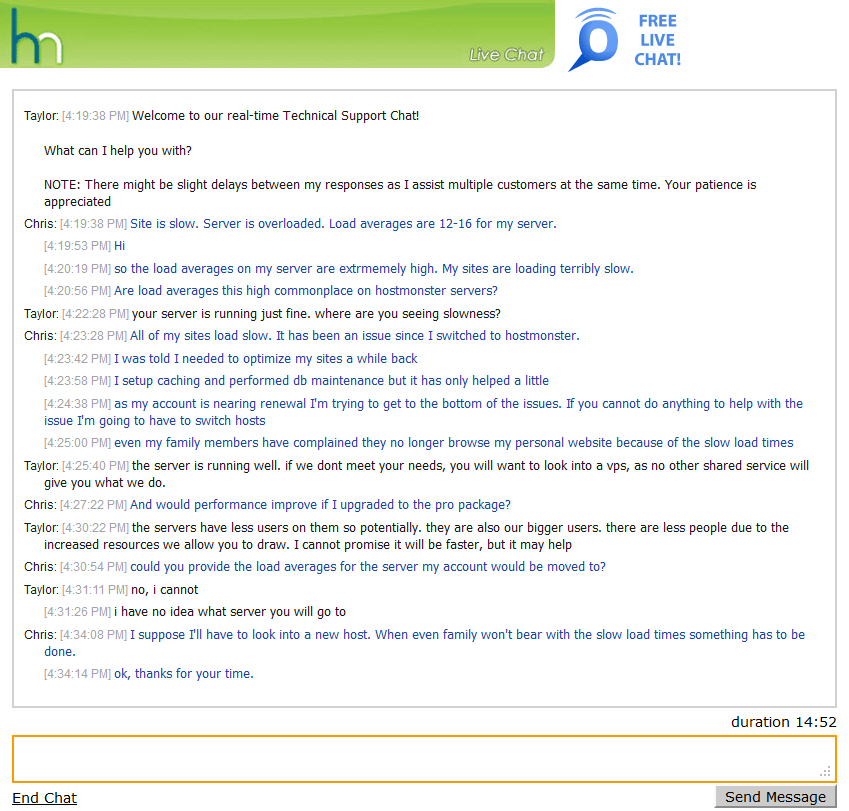
(click image to enlarge)
Since HostMonster clearly did not value me as a customer and offered nothing to resolve the situation I decided to change web hosting companies. I am now a proud customer of WebHostingHub.com. The performance on all of my websites has dramatically improved. They’re snappy even! Hopefully I haven’t lost all of my friends & family as readers. If you stopped checking in because my sites were slow, you have my apologies. I’m welcoming you back with open arms — better performance and all. If you stumbled across this post because you’re having similar issues with HostMonster’s performance–what are you waiting for? Cancel your account with HostMonster for a pro-rated refund and make the switch to WebHostingHub.com. Life here is grand :-)
«Cycling, Cycling, Everywhere! TSA: Remove Your Sweatshirt!?! »
Just wanted to chime in and say that as of 11-12-14 their tech support still leaves a lot to be desired. Over the course of a three hour live chat support session we got handed off to a different tech every 30 minutes or so due to the tech’s shift ending. They never solved the problem, never offered more than basic troubleshooting (which we’d already done), and outright lied about any work being done recently on the server that could have caused the problem. One of the techs actually put a plan upgrade in the shopping cart of the hosting account and said that would solve the problem. Wanna know what the problem was? A semi corrupt WordPress database caused by the server maintenance the day before.
People of Earth: When you choose a hosting company, do NOT overlook tech support of the company. Do a little research first – Google the company and look for reviews.
Also, it’s important to know that hosting companies get acquired by larger companies pretty often. When that happens, support usually tanks pretty fast. Case in point – EIG bought Blue Host, HostMonster, and some others – all good companies to begin with, but not any more. If your once great hosting company has taken a down turn and you want to switch to a better host, DO IT. Or hire it done.
After reading through the thread, feeling compelled to put in my 2cents:
1) After 5 years with HM only 1 or 2 incidents of outages, which I would expect with *any* provider
2) Chat support over 5 years has been outstanding, i.e. they *always* resolved my issue
3) Pricepoints are minimal for what I get
4) Feel grateful for the job HM does with the resources they have
And on a more personal level: Does it ever occur to anyone, to point out aspects of a provider they are happy with?
Peter
Hi Peter,
I’m glad you’ve experienced satisfactory service from HostMonster. I tried to work with them for 11 months but after losing nearly all of my readers, having my page rank fall due to slow load/response times, and having my own family complain about the host’s speed, I had to move on. My last ditch effort to stay with HM was outlined above. They had little interest in keeping me as a customer.
I am, perfectly willing to promote hosting providers I have had good experiences with. This site (as well as several other personal websites) is hosted at Web Hosting Hub and I’ve had excellent service from them. I’ve also worked with
InMotion Hosting for business websites and have had good experiences with them. In general I’ve found technical support at both to be knowledgeable and willing to work WITH you to resolve issues rather than BLAMING you like HostMonster constantly did.
Obviously no two experiences are alike. I can tell you that I’ve had a steady stream of backchannel complaints about HM since posting this article. If memory serves correct, you are only the second person to compliment their service.
Best of luck with HM and your web endeavors!
I do not how others, but 30 minutes waiting time to get someone alive from tech support is not acceptable for me… I am moving to a different provider too. I am fed up with Hostmonster.
Peter, I agree with your generally good experience of Hostmonster. For a shared web-hosting service performance is acceptable and the price has always been fair. Hostmonster provide SSH access (on request) and I have rarely needed to contact Support.
On those handful of occasions when I have used the Chat Live feature, the replies have been prompt, knowledgeable and courteous. Other web providers may provide a better service – I have no experience to make judgements – but I can’t fault the service provided by Host Monster and I have just renewed for another 36 months.
You might want to note that I am *not* posting an affiliate link to get any income from Host Monster or webhostinghub, nor am I promoting my own website. Some people will recommend anything to get a small affiliate fee. Beware.
Hey there!
I am experiencing the same problems with the HostMonster guys. I am so sad that I didn’t saw your post before buying the account with them…
Can you tell me how your new host compares to them? Any more problems?
WebHostingHub has been significantly better than HostMonster. Night and day.
Well, Hostmonster just reached a new low. I have not renewed my contract with them or paid for any more years of service because I am moving my web site to a new host. Today, I found that Hostmonster just charged my Paypal account $215.76 for two more years of service. I never authorized Hostmonster to do any such thing. I never authorized them to auto-renew my service or to charge a credit card or Paypal. This is out-and-out fraud.
And what is Paypal doing accepting the charge without me having anything to do with it?
Of course I am disputing the charge.
My site is slowest in host monster. They blame my scripts for this. I have WordPress 3.7.1 with wp total cache and in more plugins. It’s slowest very very very. I hate this situation.
Hi. Thanks for this article. I have had the same problems menstioned since I had my website with hostmonster and over time it had just gotten much slower. I get the same run around answers that everyone els has gotten.
I just wanted to check with you if you are still happy with your new host and how is their support and if you have to be on hold for a long time. Thanks
I’m still satisfied with Web Hosting Hub. The servers have always been responsive and email has been reliable. In the two years I’m with them I think there was only a single outage, and it only lasted a short time (maybe 2 hrs). My previous host went offline for several day periods on several occasions. My only issue with Web Hosting Hub is that I had my account suspended because my website was using too many server resources. I called support and they provided clear information about what had to be changed and immediately enabled my account. Considering how fast their servers have been and the fact that support is readily available I’d consider that a minor issue. In fact it’s more of a positive–they don’t let a single account slow down everyone else!
In any event, if you do decide to switch consider using my referral link: WebHostingHub.com
Oh, I’ve never been placed on hold for a long time. Chat support is always near instant and phone support has the usual press 1 for blah blah blah, but once you reach the right location support answers quickly.
Same issue with loading times. No solution given by the technical support, they always repeat the same thing: you should improve your code, caching, bla bla bla. That’s not the problem. How is it possible for a simple WordPress installation to take about 10-15sec to load? My frontpage is only 1MB, with my connection I’ll be able to load ten times my webpage!
Went through the same exercise with Hostmonster. I talked to them on the phone and they explained to me that my queries were bad or inefficient and I should rewrite them or hire a database engineer! They even showed me a graphics display of my “abuse” of their server.
So, I solved the issue by opening an account elsewhere and migrating my site there. Since my account with Hostmonster was new I kept everything in place there and only redirected the DNS to the new server.
Believe it or not, today I went into the Hostmonster account and took another look at that graphics. It showed that I had abused the Hostmonster server again a couple of hours before when I have been on the other server for days now!
This proves it’s a scam by Hostmonster It was invented by them. If you read the Wikipedia article on “throttling” it states: “..and gain additional revenue by compelling users on to more expensive pricing schemes where bandwidth is not throttled.”
Shame on you Hostmonster!
I also went with hostmonster due to the ssh access… does webhosting.com allow that or have you just learned to deal without?
WebHostingHub.com does not provide ssh access. I’ve just acclimated to life without. I’m one of those old-school types and I preferred coding in terminal. Now I use PSPad on a PC and Espresso on a Mac. Both work well. As for everything else I use FTP and CPanel. TBH life without ssh access isn’t all that bad.
cool :) I might have to give it a try… I am old school too, and have always preferred to just log in and do code edits from a cli, but hostmonster is just sooo slow I might have to adapt lol
I am about to leave hostmonster as well. Big mistake i made was paying upfront but I am going to talk to them about giving me my money back for months not used. Yesterday for example, their servers were down for pretty much the entire day
And today, i keep getting intermittent failures. Nothing even more annoying that not getting notified when updates happen, even to your websites…I am FED UP with hostmonster
Now scouting for new hosts
Yes, and I’ve been having a lot of trouble getting into my email. Sometimes I have to wait half an hour before I see anything more than, “Wating for host391.hostmonster.com”
Wonderful goods from you, man. I’ve take into accout your stuff previous to and you’re just extremely wonderful.
I really like what you’ve received here, certainly like what you’re stating and the best way in which you
say it. You’re making it entertaining and you continue to care for to stay it sensible. I can’t wait to
learn far more from you. That is really a tremendous website.
Here is my site financial help
Same here. Hostmonster messed up my personal sites by taking over 20 seconds to resolve my .cc domains with EVERY page load, making it impossible to navigate my sites. Now I’m looking at a “cannot connect to server” for our company website for over an hour also. Still waiting for support to connect using live chat because last time I tried e-mail support it took over 48 hours for a dumb response which needed me to provide the exact same information as in my first mail and then took over 50 hours again for a second response. While I was typing this, I got connected to support who told me the server was undergoing a DDoS attack. When I asked why the server status page was reporting there are “No Known Issues” and the server status is “OK” the rep told me they won’t update that page until they know when the problem will be solved. I figure they only know how long this problem will take when the DDoS attack is over, then there won’t be any problems anymore, meaning the server status page will always report everything if fine and dandy during DDoS attacks, even if they take hours and hours. I already switched my personal sites to EuroVPS, which is slightly more expensive (about 25% extra) but way, WAY faster. I’ll make sure to convince my boss to make the switch too! Furthermore I had to contact EuroVPS support three times for some personal assistance in moving my sites and setting up stuff and the average response time through e-mail was between 25-30 minutes, which is also much better. I gladly pay that extra 25% for no more headaches!
I was just looking at Hostmonster’s policies, and saw:
“Reminder: The Terms of Service does not allow inappropriate use of our network for online storage. Please see “UNLIMITED” USAGE POLICIES AND DEFINITIONS for more information. Files uploaded in connection with your hosted site are always welcome.”
So before you sign up, they offer you huge amounts of storage. After you sign up, storing large numbes of files is redefined to be “inappropriate”.
What a cute bait-and-switch trick.
For all you wordpress folk, try loading the js files from the footer. Put this in your functions file ..
/**
* Automatically move JavaScript code to page footer, speeding up page loading time.
*/
remove_action(‘wp_head’, ‘wp_print_scripts’);
remove_action(‘wp_head’, ‘wp_print_head_scripts’, 9);
remove_action(‘wp_head’, ‘wp_enqueue_scripts’, 1);
add_action(‘wp_footer’, ‘wp_print_scripts’, 5);
add_action(‘wp_footer’, ‘wp_enqueue_scripts’, 5);
add_action(‘wp_footer’, ‘wp_print_head_scripts’, 5);
I have drupal also, and that IS getting too much of a pain ..
good luck
I’m about ready to make a move away from Hostmonster as well. I have a WordPress blog and have had it for almost three years.A couple of months ago, I was unable to login on my site and it was nerve wracking. They told me there was some type of maintenance going on and it shouldn’t take long. Well it did. If I can’t get on that means my readers can’t either. Today I tried to send myself an email from another account and it bounced back saying I was over quota. When I tried to get into my cPanel at Hostmonster this is the message I received:
Your username onebodyo is installed correctly, but your account cannot be repaired at this time. Try resetting your password later or contact support if this problem persists.
I submitted a help ticket and got the autoreply. Still trying to login to no avail and still no answer from support.
Fast forward to late January, are you still happy with WebHostingHub? I’m currently in the same predicament.
I’m still happy. I’ve had one small issue where my account was suspended for using too many server resources. They claimed one of the email accounts was too large. I had to call them but the account was immediately re-enabled. This site is still hosted at WebHostingHub.com. I have no plans to move.
I’m currently using hostmonster and having all sorts of issues. This is my first hosting site – transferred from blogger and made a complete switch in November 2012. Since day 1 I have been having problems. Sure, I have a larger readership since making the switch (I’ve been having my own domain, just switched to a hosting site), but I’m always getting some sort of error and slow load times. I thought it was me til I started doing research. Like everyone else I’ve been clearing cache, optimizing, searching for other ways to clean up the site, etc. As of now I feel like I’m at a dead end and I paid for a 4 year subscription!
You should be able to cancel and get a pro-rated refund. Give them a call. As for hosts — WebHostingHub.com has been great.
20 or 30-second load times would be nice. Both last Wednesday and today, the load times for email pages are minutes. Like 2 to 5 minutes to get a page loaded.
Hostmonster is really getting bad. I need a new host.
Just switch hosts. I lost all hope for improved performance on HostMonster. When I started to make an issue of it I received emails stating that upgrades were taking place to improve performance. Nothing ever changed. As you can see they did not value me as a customer, and though they claimed I would never find another host that offered what they did — I did. Schiffner.com is still hosted on WebHostingHub.com — I don’t have too many complaints. My account was temporarily suspended once for using too many server resources. It hasn’t been suspended since. Support told me what had to be changed and immediately re-enabled my account.
I wrote a script that monitors server load averages and Web Hosting Hub load averages are roughly 14% that of what HostMonster’s were. In other words HostMonster’s servers had at least 5-6 times more load on them under normal conditions. At peak browsing times (lunch, after-work) HostMonster’s servers had nearly 20 times the load of Web Hosting Hub. I can tell you other hosts to stay away from…DreamHost, HostGator, BlueHost, and GoDaddy. They all oversell their server as much as HostMonster.
Switch hosts, yes. I’m looking into co-locating my own server box.
P.S.: I contacted Hostmonster with their chat line, and got the usual runaround. He or she insisted that the pages all loaded fine there, so the problem must be somewhere else in the network. They lie. They always say that.
I showed him/her a traceroute output that showed 7-second delays in two links in their network. So they disconnected me, and the next thing I saw was a questionaire: “How likely are you to recommend Hostmonster to a friend?” I checked the zero rating.
Had the same scenario with Hostmonster a few minutes ago. Of course they blame my WordPress plugins. Its taking up to 20 seconds to load my sites. Eighteen of those 20 seconds my browser says connecting. Hostmonster is over their head, they need more servers and bandwidth.
Hey. I have same problem here. I guess I have to change the host, too. So, WebHostingHub.com are really speedy or not?
It’s been fast for me. They are fairly good about suspending accounts that degrade performance for other users on the server.